
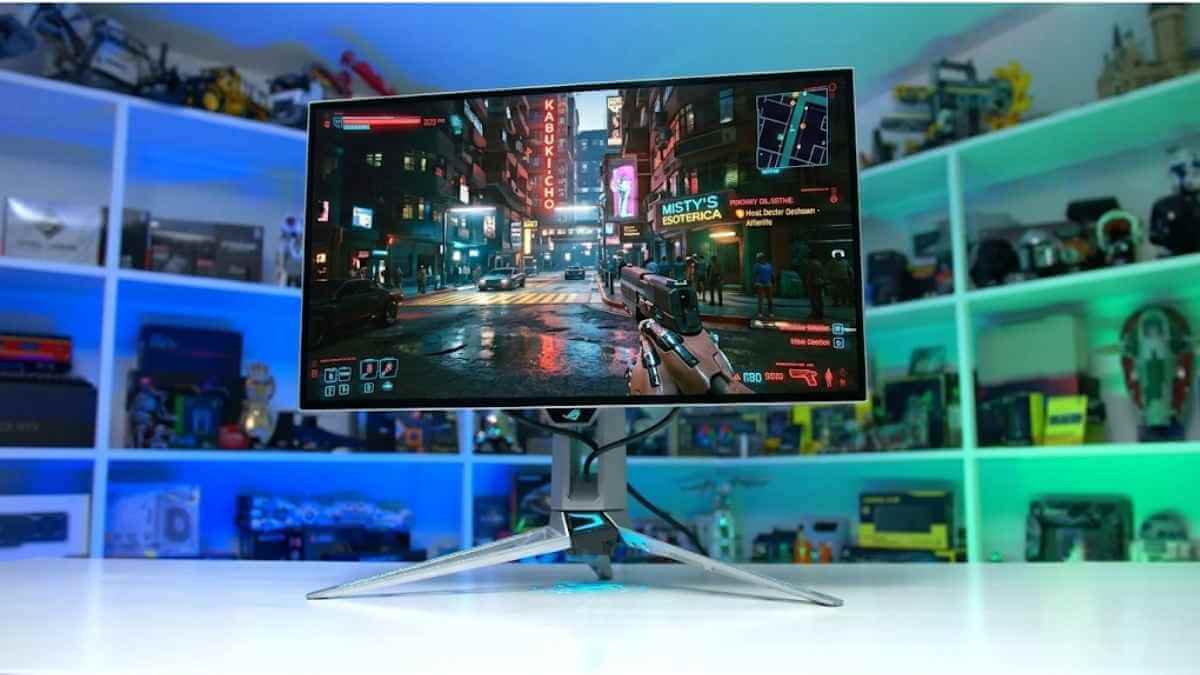

Choosing the best 1440p OLED gaming monitor is no longer just about finding the highest refresh rate. Today’s options range from affordable 240Hz models to ultra-fast 360Hz and 540Hz displays, with both QD-OLED and WOLED panels offering different advantages in color, brightness, text clarity, and reflection handling.
In this guide, we compare ten of the best 1440p OLED gaming monitors available in 2026. Whether you want the best overall performance, strong HDR, smooth competitive gaming, better console compatibility, or a more affordable entry into OLED, these recommendations will help you find the right monitor for your budget and setup.
What Is the Best 1440p OLED Gaming Monitor in 2026?
The best 1440p OLED gaming monitor in 2026 is the ASUS ROG Swift OLED PG27AQWP-W. It runs at 540Hz natively, and its 4th-Gen Tandem WOLED panel gets brighter than any other monitor on this list, so it holds up well even outside a dark room. Its response time stays near-instant across its full refresh range, making it the top pick for gamers who won't compromise on speed or picture quality.
Not every gamer needs this level of performance, though. The ASUS ROG Strix OLED XG27ACDNG and Dell Alienware AW2725DF both deliver 360Hz QD-OLED gaming at a lower price, and the Alienware AW2726DM brings OLED down to $350 for gamers trying it for the first time. The right pick depends on your budget, your GPU, and whether you also use your monitor for work outside of gaming.
1. ASUS ROG Swift OLED PG27AQWP-W
The best 1440p gaming monitor overall is the ASUS ROG Swift OLED PG27AQWP-W. It's a flagship OLED with an exceptionally high refresh rate, making fast-paced gaming feel smooth and responsive. It runs at 540Hz at its native 1440p resolution, and you can push it to 720Hz at 720p using its dual-mode feature, so it adapts well whether you're playing competitive shooters or slower-paced titles. Its response time is nearly instant across the refresh rate range, so fast motion stays sharp without noticeable trailing, and it supports all major VRR formats to keep screen tearing in check.
It also holds up well outside of pure gaming performance. Its Tandem WOLED panel produces deep, uniform blacks in dark rooms with no noticeable blooming around bright elements, and it gets bright enough to remain watchable even with some ambient light in the room. Colors are vivid, and highlights stand out clearly in HDR content. The tradeoff is its glossy coating, which delivers a clearer image at the cost of noticeable reflections in bright rooms; if that's a concern, the Gigabyte MO27Q28G is worth considering instead, though it doesn't get quite as bright.
Key Specifications
- Screen size: 26.5-inch
- Panel type: OLED
- Sub-type: Tandem WOLED with TrueBlack Glossy coating
- Resolution: 2560 x 1440 (QHD)
- Brightness: SDR typical not specified / 1,500 nits peak HDR
- Refresh rate: 540Hz at QHD / 720Hz in HD dual mode
- Response time: 0.02ms GtG
- Viewing angle: 178° / 178°
- Contrast ratio: 1,500,000:1
- Speakers: No
- Ports: 2 x HDMI 2.1, 1 x DisplayPort 2.1, 3 x USB 3.2 Gen 1 Type-A, 1 x earphone jack
OUR INSIGHT: The PG27AQWP-W's 540Hz refresh rate beats every other monitor on this list, including the 360Hz Dell Alienware AW2725DF and ASUS ROG Strix OLED XG27ACDNG. Its Tandem WOLED panel also gets brighter than the Gigabyte MO27Q28G. The trade-off is its glossy coating, which reflects more light than the LG 27GS95QE-B's matte finish.
2. ASUS ROG Strix OLED XG27ACDNG
If the ASUS ROG Swift OLED PG27AQWP-W is out of your price range or you won't take advantage of its high refresh rate, check out the ASUS ROG Strix OLED XG27ACDNG. You can often find it for less than the PG27AQWP-W, especially when it's on sale. It offers the same near-instantaneous response time, so motion is sharp. However, it has a lower 360Hz refresh rate, so it's not quite as smooth and responsive. It lacks a dual-mode feature to make it versatile for playing different types of games, but its refresh rate is still high enough for most PC gamers.
It has a few advantages over the PG27AQWP-W, such as its QD-OLED panel delivering more vivid colors. One downside is that blacks look purple in bright rooms on this monitor, so you have to use it in a dark room to get the best performance. Luckily, it has typical gaming features, like support for all common VRR formats and HDMI 2.1 bandwidth. This means it supports most common signals with consoles, like a PS5, PS5 Pro, Xbox Series X, or Nintendo Switch 2. That said, if you don't need a QD-OLED panel and prefer a matte coating instead, the LG 27GS95QE-B is a good alternative, but it isn't quite as fast.
Key Specifications
- Screen size: 26.5-inch
- Panel type: OLED
- Sub-type: QD-OLED with anti-reflection coating
- Resolution: 2560 x 1440 (QHD)
- Brightness: SDR typical not specified / 1,000 nits peak HDR
- Refresh rate: 360Hz
- Response time: 0.03ms GtG
- Viewing angle: 178° / 178°
- Contrast ratio: 1,500,000:1
- Speakers: No
- Ports: 2 x HDMI 2.1, 1 x DisplayPort 1.4 with DSC, 1 x USB-C with 90W Power Delivery, 3 x USB 3.2 Gen 1 Type-A, 1 x earphone jack
OUR INSIGHT: The XG27ACDNG's QD-OLED panel delivers more vivid colors than the ASUS ROG Swift OLED PG27AQWP-W's WOLED panel. If you frequently game in a bright room, the Dell Alienware AW2725DF handles ambient light better with its matte coating. It wins over the Gigabyte MO27Q2 on refresh rate, though the Gigabyte edges ahead on price.
3. Gigabyte MO27Q28G Matte / MO27Q28GR Glossy
If you want an OLED gaming monitor with class-leading brightness without paying flagship prices, the Gigabyte MO27Q28G is a strong pick. It uses the same 4th-generation Tandem WOLED panel found in the ASUS ROG Swift OLED PG27AQWP-W, so it reaches similarly high peak brightness, but its 280Hz refresh rate is much lower than the PG27AQWP-W's 540Hz. This is still fast enough for the vast majority of competitive games, and its response time stays fast and consistent across its refresh range, so motion doesn't look blurry.
It comes in two coating options: the MO27Q28G has a matte finish, and the MO27Q28GR has a glossy finish. The matte version handles ambient light better and is the safer choice for a bright room, while the glossy version produces a slightly clearer image with deeper blacks, but at the cost of more noticeable reflections. Either way, it supports HDMI 2.1 bandwidth and a USB-C KVM switch, making it a practical choice for a mixed gaming and productivity setup. If you don't need this much brightness and want to save money instead, the Gigabyte MO27Q2 is a cheaper alternative, but it uses an older-generation panel with lower peak brightness.
Key Specifications
- Screen size: 27-inch
- Panel type: OLED
- Sub-type: 4th Gen Primary RGB Tandem WOLED; matte anti-reflection on MO27Q28G / RealBlack Glossy on MO27Q28GR
- Resolution: 2560 x 1440 (QHD)
- Brightness: 335 nits typical SDR / 1,500 nits peak HDR
- Refresh rate: 280Hz
- Response time: 0.03ms GtG
- Viewing angle: 178° / 178°
- Contrast ratio: 1,500,000:1
- Speakers: 2 x 5W
- Ports: 2 x HDMI 2.1, 1 x DisplayPort 1.4, 1 x USB-C with up to 18W Power Delivery, 2 x USB 3.2 downstream, 1 x USB 3.2 upstream, 1 x earphone jack
OUR INSIGHT: The MO27Q28G reaches similar peak brightness to the ASUS ROG Swift OLED PG27AQWP-W at a lower price, though its 280Hz refresh rate trails the PG27AQWP-W's 540Hz. It beats the Alienware AW2726DM on HDR certification, but the AW2726DM wins on price for buyers new to OLED.
4. Alienware AW2726DM
If you want to try OLED for the first time without spending much money, the Alienware AW2726DM is the cheapest way to do it. It has the same 240Hz refresh rate and near-instant response time as more expensive QD-OLED monitors, so motion still looks just as sharp during fast-paced games. It also supports HDMI 2.1 bandwidth and common VRR formats, so it works well with a PS5, PS5 Pro, or Xbox Series X.
The tradeoff for its low price is picture quality. It has a lower peak brightness than other QD-OLED monitors on this list, and it lacks a VESA DisplayHDR certification, so HDR highlights don't stand out as much. It still displays deep, uniform blacks in dark rooms, which is the main reason to choose an OLED panel in the first place. If brightness matters more to you than price, the Samsung Odyssey OLED G6 (G61SH) is a better all-around choice, though it costs significantly more.
Key Specifications
- Screen size: 26.5-inch
- Panel type: OLED
- Sub-type: QD-OLED with anti-reflection coating
- Resolution: 2560 x 1440 (QHD)
- Brightness: 200 nits typical / 400 nits peak HDR at 10% APL
- Refresh rate: 240Hz
- Response time: 0.03ms GtG
- Viewing angle: 178° / 178°
- Contrast ratio: 1,500,000:1
- Speakers: No
- Ports: 2 x HDMI 2.1 TMDS, 1 x DisplayPort 1.4 with DSC
OUR INSIGHT: The AW2726DM is the cheapest OLED on this list, undercutting the Samsung Odyssey OLED G6 (G61SH) and Gigabyte MO27Q2 on price. It matches their 240Hz refresh rate and response time, but it lacks a DisplayHDR certification, so HDR highlights don't stand out the way they do on the G61SH.
5. Samsung Odyssey OLED G6 G61SH
If the Alienware AW2726DM's lower brightness is a dealbreaker, the Samsung Odyssey OLED G6 (G61SH) is a well-rounded step up. It has the same 240Hz refresh rate and 1440p resolution, but it gets noticeably brighter, so HDR highlights stand out more, and it's easier to use in a room with some ambient light. Its response time is just as fast, so you don't lose any motion clarity by choosing this monitor over a faster, more expensive model.
It also includes a thermal management system designed to reduce long-term burn-in risk, along with factory color calibration that Samsung markets as Pantone Validated. This makes it a safe choice if you're new to OLED and worried about panel longevity. It supports HDMI 2.1 bandwidth and FreeSync Premium, covering the basics for both PC and console gaming. If you want a higher refresh rate instead of extra brightness, the Dell Alienware AW2725DF is a better fit, but it doesn't have the same burn-in safeguards.
Key Specifications
- Screen size: 27-inch class
- Panel type: OLED
- Sub-type: QD-OLED with Glare Free coating
- Resolution: 2560 x 1440 (QHD)
- Brightness: 200 nits typical / 400 nits peak HDR
- Refresh rate: 240Hz
- Response time: 0.03ms GtG
- Viewing angle: 178° / 178°
- Contrast ratio: 1,000,000:1 on the US listing / 1,500,000:1 on some regional listings
- Speakers: No
- Ports: 1 x HDMI 2.1, 1 x DisplayPort 1.4, 1 x headphone jack
OUR INSIGHT: The G61SH gets noticeably brighter than the budget-focused Alienware AW2726DM, and its thermal management system reduces long-term burn-in risk better than most monitors on this list. It matches the Dell Alienware AW2725DF's 240Hz refresh tier but doesn't push to 360Hz like the AW2725DF.
6. Dell Alienware AW2725DF
If you want a 360Hz refresh rate without the glossy coating of the ASUS ROG Strix OLED XG27ACDNG, the Dell Alienware AW2725DF is a good alternative. It has the same fast response time, so motion looks just as sharp, but its matte coating handles ambient light better, making it a more practical choice for a bright room. It supports HDMI 2.1 bandwidth and dual VRR compatibility, working cleanly with both NVIDIA and AMD graphics cards.
Its QD-OLED panel delivers wide color coverage similar to the XG27ACDNG, so you're not giving up color performance to get the matte finish. The main tradeoff is connectivity; it lacks USB-C power delivery, so it can't charge a laptop the way some other monitors on this list can. If charging a laptop from your monitor matters to you, or if you split your time between gaming and desk work, the LG 27GS95QE-B is a better option, though its refresh rate is lower.
Key Specifications
- Screen size: 26.7-inch
- Panel type: OLED
- Sub-type: QD-OLED with anti-reflection coating
- Resolution: 2560 x 1440 (QHD)
- Brightness: 250 nits typical SDR / 400 nits True Black HDR / 1,000 nits peak HDR
- Refresh rate: 360Hz through DisplayPort / 144Hz through HDMI
- Response time: 0.03ms GtG
- Viewing angle: 178° / 178°
- Contrast ratio: 1,500,000:1
- Speakers: No
- Ports: 2 x DisplayPort 1.4, 1 x HDMI 2.1, 1 x USB-B upstream, 3 x USB-A downstream, 1 x USB-C downstream with charging
OUR INSIGHT: The AW2725DF's matte coating handles bright rooms better than the glossy ASUS ROG Strix OLED XG27ACDNG, while matching its 360Hz refresh rate and QD-OLED color coverage. It lacks the LG 27GS95QE-B's clearer text rendering, so it suits gaming setups more than mixed productivity use.
7. LG UltraGear 27GS95QE-B
If you spend as much time working as you do gaming, the LG 27GS95QE-B is the monitor built for that split. It has a 240Hz refresh rate, which is lower than the Dell Alienware AW2725DF's 360Hz, so competitive gaming feels slightly less smooth. In exchange, its WOLED panel renders small text more clearly than the QD-OLED panels used in the AW2725DF and the ASUS ROG Strix OLED XG27ACDNG, which matters if you spend hours reading code or documents on the same screen.
Its matte coating also handles office lighting well, so reflections aren't a problem under overhead lights. It supports HDMI 2.1 bandwidth and dual VRR compatibility, so gaming performance doesn't suffer despite the productivity focus. The main downside is brightness; its SDR output is lower than most QD-OLED monitors on this list, so it doesn't fight glare as well in a very bright room. If text clarity isn't a priority and you'd rather save money, the Gigabyte MO27Q2 is a cheaper alternative with similar gaming performance.
Key Specifications
- Screen size: 26.5-inch
- Panel type: OLED
- Sub-type: OLED with anti-glare and low-reflection coating; exact OLED subtype is not stated by LG
- Resolution: 2560 x 1440 (QHD)
- Brightness: 275 nits typical / HDR peak brightness not specified
- Refresh rate: 240Hz
- Response time: 0.03ms GtG
- Viewing angle: 178° / 178°
- Contrast ratio: 1,500,000:1
- Speakers: No
- Ports: 2 x HDMI 2.1, 1 x DisplayPort 1.4, 2 x USB 3.0 downstream, 1 x USB 3.0 upstream, 1 x 4-pole headphone jack, 1 x optical S/PDIF output
OUR INSIGHT: The LG 27GS95QE-B's WOLED panel renders text more clearly than the QD-OLED panels on the Dell Alienware AW2725DF and Gigabyte MO27Q2. Its 240Hz refresh rate trails the AW2725DF's 360Hz, and its SDR brightness falls behind most QD-OLED options on this list.
8. Gigabyte MO27Q2
If the LG 27GS95QE-B is more than you want to spend, the Gigabyte MO27Q2 covers the essentials at a lower price. It has the same 240Hz refresh rate and a similarly fast response time, so gaming still feels smooth. Its QD-OLED panel produces more vivid colors than the LG's WOLED panel, though it doesn't render small text quite as cleanly.
It also has a matte coating, so it handles ambient light about as well as the LG, making it a reasonable choice for a bright room. It includes a USB-C KVM switch, which is useful if you regularly switch between a work laptop and a gaming PC. The tradeoff compared to pricier QD-OLED monitors on this list is peak brightness, which is lower, so HDR highlights don't stand out as much. If you want higher peak brightness and a faster refresh rate instead, the MSI MPG 271QRX is a better choice, though it costs more.
Key Specifications
- Screen size: 27-inch
- Panel type: OLED
- Sub-type: QD-OLED with anti-reflection coating
- Resolution: 2560 x 1440 (QHD)
- Brightness: 250 nits typical SDR / 1,000 nits peak HDR
- Refresh rate: 240Hz
- Response time: 0.03ms GtG
- Viewing angle: 178° / 178°
- Contrast ratio: 1,500,000:1
- Speakers: 2 x 5W
- Ports: 2 x HDMI 2.1, 1 x DisplayPort 1.4, 1 x USB-C with up to 18W Power Delivery, 2 x USB 3.2 downstream, 1 x USB 3.2 upstream, 1 x earphone jack
OUR INSIGHT: The MO27Q2 matches the LG 27GS95QE-B's 240Hz refresh rate at a lower price, with more vivid QD-OLED colors. It loses to the MSI MPG 271QRX on peak HDR brightness, but its built-in KVM switch is more useful for gamers who also work from the same desk.
9. MSI MPG 271QRX QD-OLED
If you want a 360Hz refresh rate but the Dell Alienware AW2725DF isn't available or isn't on sale, the MSI MPG 271QRX is a solid alternative. It has the same fast response time and 1440p resolution, so competitive gaming feels just as smooth. Its QD-OLED panel reaches a higher peak HDR brightness than most other 1440p OLEDs on this list, so highlights stand out more in HDR content.
It includes burn-in mitigation features that automatically dim static elements like taskbars and logos, which is useful if you also use this monitor for everyday desktop work. The main downside is connectivity; it doesn't offer as extensive a USB-C KVM setup as the Gigabyte MO27Q2, so it's less convenient for switching between multiple devices. If simplicity and a lower price matter more than raw refresh rate, the ViewSonic VX2738-2K-OLED is a better starting point.
Key Specifications
- Screen size: 26.5-inch
- Panel type: OLED
- Sub-type: 3rd Gen QD-OLED with anti-reflection coating
- Resolution: 2560 x 1440 (WQHD)
- Brightness: 250 nits typical SDR / 1,000 nits peak HDR
- Refresh rate: 360Hz
- Response time: 0.03ms GtG
- Viewing angle: 178° / 178°
- Contrast ratio: 1,500,000:1
- Speakers: No
- Ports: 2 x HDMI 2.1, 1 x DisplayPort 1.4a, 1 x USB-C with 90W Power Delivery, 2 x USB 2.0 Type-A, 1 x USB 2.0 Type-B, 1 x headphone jack
OUR INSIGHT: The MPG 271QRX matches the Dell Alienware AW2725DF's 360Hz refresh rate but reaches higher peak HDR brightness. It falls behind the Gigabyte MO27Q2 on KVM functionality, making it a better fit for gaming-focused setups than mixed work-and-play desks.
10. ViewSonic VX2738-2K-OLED
The ViewSonic VX2738-2K-OLED is the best choice if you've never owned an OLED monitor before. It's a 27-inch QD-OLED display with a 240Hz refresh rate at its native 1440p resolution, giving you the core OLED experience: near-instant response time and deep black without the price of a flagship model like the ASUS ROG Swift OLED PG27AQWP-W. Its response time stays fast and consistent, so motion looks sharp even in fast-paced games, and it supports FreeSync Premium and G-Sync Compatible to keep screen tearing under control.
Picture quality is solid but not class-leading. Its QD-OLED panel produces vivid colors and true blacks in dark rooms, but its SDR brightness is lower than the ASUS ROG Strix OLED XG27ACDNG's, so it doesn't fight glare as well in a well-lit room. It also lacks a dual HDMI 2.1 setup for running two consoles at once. However, a single HDMI 2.1 port is enough for a PS5, PS5 Pro, or Xbox Series X. Built-in burn-in protection runs automatically in the background, so new OLED owners don't need to configure anything manually.
Key Specifications
- Screen size: 27-inch class, 26.7-inch viewable
- Panel type: OLED
- Sub-type: QD-OLED with anti-reflection coating
- Resolution: 2560 x 1440 (QHD)
- Brightness: 200 nits typical / HDR peak brightness not specified
- Refresh rate: 240Hz
- Response time: 0.03ms GtG
- Viewing angle: 178° / 178°
- Contrast ratio: 150,000:1
- Speakers: 2 x 2W
- Ports: 2 x HDMI 2.1, 2 x DisplayPort 1.4, 1 x 3.5mm audio output
OUR INSIGHT: The VX2738-2K-OLED delivers the same 240Hz QD-OLED core experience as the Alienware AW2726DM and Samsung Odyssey OLED G6 (G61SH) at the lowest price on this list. It trails both on SDR brightness and lacks the dual HDMI 2.1 setup found on pricier options here.
Best 1440p OLED Gaming Monitors Compared
| # | Monitor | Screen Size | Resolution | Panel | Refresh Rate | Response Time | HDR | Price |
|---|---|---|---|---|---|---|---|---|
| 1 | ASUS ROG Swift OLED PG27AQWP-W | 27" | 2560×1440 | 4th-Gen Tandem WOLED | 540Hz / 720Hz Dual Mode | 0.02ms | DisplayHDR 500 True Black | ~$1,100 |
| 2 | ASUS ROG Strix OLED XG27ACDNG | 26.5" | 2560×1440 | QD-OLED | 360Hz | 0.03ms | DisplayHDR 400 True Black | ~$750 |
| 3 | Gigabyte MO27Q28G / MO27Q28GR | 27" | 2560×1440 | 4th-Gen WOLED (Tandem) | 280Hz | 0.03ms | DisplayHDR True Black 500 | ~$600 |
| 4 | Alienware AW2726DM | 26.5" | 2560×1440 | QD-OLED | 240Hz | 0.03ms | HDR10 (no cert) | ~$350 |
| 5 | Samsung Odyssey OLED G6 (G61SH) | 27" | 2560×1440 | QD-OLED | 240Hz | 0.03ms | HDR10 | ~$580 |
| 6 | Dell Alienware AW2725DF | 27" | 2560×1440 | QD-OLED, Matte | 360Hz | 0.03ms | DisplayHDR True Black 400 | ~$675 |
| 7 | LG 27GS95QE-B | 27" | 2560×1440 | WOLED, Matte | 240Hz | 0.03ms | DisplayHDR True Black 400 | ~$590 |
| 8 | Gigabyte MO27Q2 | 27" | 2560×1440 | QD-OLED (3rd Gen), Matte | 240Hz | 0.03ms | DisplayHDR True Black 400 | ~$450* |
| 9 | MSI MPG 271QRX | 27" | 2560×1440 | QD-OLED (3rd Gen) | 360Hz | 0.03ms | DisplayHDR True Black 400 | ~$650 |
| 10 | ViewSonic VX2738-2K-OLED | 26.7" | 2560×1440 | QD-OLED | 240Hz | 0.03ms | HDR10 | ~$480 |
1440p OLED Gaming Monitor Buying Guide
What Refresh Rate Do You Need?
Most gamers only need 240Hz, available on the Samsung Odyssey OLED G6 (G61SH). Competitive players benefit from 360Hz, found on the ASUS ROG Strix OLED XG27ACDNG and Dell Alienware AW2725DF. Dedicated esports setups can reach 480–540Hz, like the ASUS ROG Swift OLED PG27AQWP-W, but this needs a high-end GPU to use meaningfully. Dual Mode lets a monitor drop resolution to unlock an even higher refresh rate.
QD-OLED vs WOLED
QD-OLED and WOLED differ in color, black levels, and text clarity. QD-OLED, used in the Dell Alienware AW2725DF, produces wider color volume and higher peak brightness. WOLED, used in the LG 27GS95QE-B, renders text more clearly thanks to its RGBW subpixel layout. QD-OLED's triangular subpixels can cause minor color fringing on small text at 1440p. Coating matters too: matte QD-OLED panels handle bright rooms better than glossy ones. Neither panel type is universally better; your primary use case decides.
OLED Burn-In
Burn-in is a real but manageable risk. Static elements like taskbars and HUDs left on screen too long cause the most risk. Manufacturers counter this with pixel refresh cycles and logo dimming; the Samsung Odyssey OLED G6 (G61SH) also uses thermal modulation. Most 1440p OLEDs here, including the Gigabyte MO27Q28G, carry a 3-year burn-in warranty. Enabling a monitor's OLED care settings on day one reduces practical risk further.
Glossy vs Matte
Glossy coatings deliver a clearer image; matte coatings control reflections. The ASUS ROG Swift OLED PG27AQWP-W's glossy coating looks sharper in a dark room but reflects light aggressively under overhead lighting. The LG 27GS95QE-B's matte coating trades a little clarity for much better usability in a bright room. Choose glossy for dedicated dark-room gaming, matte for shared or well-lit spaces.
PC and Console Compatibility
HDMI version alone doesn't guarantee full console performance. Confirm 1440p at 120Hz, VRR support, HDR support, HDMI bandwidth, and DisplayPort capability. The Alienware AW2726DM and Samsung Odyssey OLED G6 (G61SH) include HDMI 2.1, unlocking 1440p at 120Hz with VRR on a PS5 or Xbox Series X. HDMI 2.0 caps console performance well below that.
HDR Certifications
VESA DisplayHDR True Black 400 and 500 differ mainly in peak brightness. True Black 400, on the Dell Alienware AW2725DF, guarantees baseline HDR contrast. True Black 500, on the Gigabyte MO27Q28G, requires higher brightness, so highlights look punchier. Both require true 0-nit blacks, which OLED panels achieve more easily than LCDs.
Text and Productivity Use
Subpixel layout affects daily comfort. WOLED, in the LG 27GS95QE-B, renders text edges more cleanly than QD-OLED's triangular layout. Display scaling narrows this gap but doesn't close it. Matte coatings matter more here too, since office lighting causes more glare than a dim gaming room.
Who Should Buy a 1440p OLED Monitor?
Buy One If
- Fast response time matters for your games
- You want deep blacks and real HDR
- You game at 240Hz or higher
- You want more FPS than 4K OLED allows on your GPU
Avoid One If
- You use static spreadsheets or office apps all day
- Your room has strong, uncontrollable light
- You want zero burn-in risk
- Your budget is under $350
Frequently Asked Questions About 1440p OLED Gaming Monitors
Is a 1440p OLED gaming monitor worth it?
Yes, for most gamers, a 1440p OLED gaming monitor is worth the upgrade. It delivers near-instant response time, deep blacks, and vivid colors that LCD panels can't match at any price. Monitors like the ASUS ROG Strix OLED XG27ACDNG and Gigabyte MO27Q2 bring these benefits to the $500–750 range, making OLED practical rather than a luxury-only purchase in 2026.
Is 240Hz enough for competitive gaming?
Yes, 240Hz is enough for competitive gaming for the vast majority of players. It offers a major smoothness jump over 144Hz and matches what most human reaction times can perceive. Monitors like the Samsung Odyssey OLED G6 (G61SH) and Alienware AW2726DM run at 240Hz, and only dedicated esports players chasing every frame need to go higher, like 360Hz or 540Hz.
Which 1440p OLED panel type suits your use case: WOLED or QD-OLED?
WOLED suits mixed gaming and productivity use, while QD-OLED suits pure gaming. The LG 27GS95QE-B's WOLED panel renders text more clearly for coding or browsing. QD-OLED monitors like the Dell Alienware AW2725DF produce more saturated colors and higher peak brightness, making them the better choice for a dedicated gaming setup.
Is QD-OLED better than WOLED?
Neither panel is universally better; each wins in different areas. QD-OLED, used in the MSI MPG 271QRX, delivers wider color volume and higher HDR brightness. WOLED, used in the Gigabyte MO27Q28G, renders small text more clearly and avoids the color fringing that affects QD-OLED subpixel layouts. Your primary use case decides which wins.
What GPU do I need for a 1440p 240Hz OLED monitor?
An RTX 4070 or RX 7800 XT-class GPU is enough to reach 1440p at 240Hz in most current games. Faster panels need more GPU headroom: the ASUS ROG Strix OLED XG27ACDNG's 360Hz benefits from an RTX 4080 or better, while the ASUS ROG Swift OLED PG27AQWP-W's 540Hz ceiling really needs an RTX 5080 or above.
Can I use a 1440p OLED monitor with PS5 or Xbox Series X?
Yes, as long as the monitor has an HDMI 2.1 port. Monitors like the Samsung Odyssey OLED G6 (G61SH) and Alienware AW2726DM both include HDMI 2.1, enabling 1440p at 120Hz with VRR on PS5 and Xbox Series X. Always confirm HDMI 2.1 specifically, since some monitors still ship with HDMI 2.0 only.
Do OLED monitors support HDR properly at 1440p?
Yes, most current 1440p OLED monitors support HDR properly through VESA DisplayHDR True Black certification. The Gigabyte MO27Q28G reaches DisplayHDR True Black 500 with 1,500-nit peak brightness. Budget models like the Alienware AW2726DM support basic HDR10 but lack formal certification, so their HDR highlights are noticeably less impactful.
Are OLED gaming monitors good in bright rooms?
It depends on the coating. Matte OLED monitors like the LG 27GS95QE-B and Dell Alienware AW2725DF handle ambient light well and stay usable in daylight. Glossy models like the ASUS ROG Swift OLED PG27AQWP-W look sharper in a dark room but reflect more light, making them less ideal for a sunlit office.
Conclusion
The ASUS ROG Swift OLED PG27AQWP-W is the best 1440p OLED gaming monitor overall, thanks to its 540Hz refresh rate and class-leading brightness. Most gamers don't need to spend $1,100 to get a great OLED experience, though. The ASUS ROG Strix OLED XG27ACDNG and Dell Alienware AW2725DF both deliver 360Hz QD-OLED performance at a lower price, while the Gigabyte MO27Q28G matches the flagship's panel technology at a fraction of the cost.
Budget-conscious buyers have real options too. The Alienware AW2726DM brings QD-OLED down to $350, making it the cheapest way to try OLED for the first time. If your setup splits time between gaming and productivity work, the LG 27GS95QE-B's WOLED panel handles text more clearly than any QD-OLED on this list.
Match your choice to how you actually use your monitor. Competitive players should prioritize refresh rate and pick the ASUS ROG Strix OLED XG27ACDNG or MSI MPG 271QRX. Console gamers need HDMI 2.1, which every monitor here includes. Buyers in bright rooms should lean toward a matte coating, like the Samsung Odyssey OLED G6 (G61SH) or LG 27GS95QE-B, over a glossy panel.

Leave a Reply