

Finding the perfect balance of price, performance, and features in a monitor can feel like a treasure hunt. You want high refresh rates, sharp resolutions, and vibrant colors, but your budget cap sits firmly at $300. The market has evolved, and this price point is now a sweet spot, packed with options that were considered premium just a few years ago.
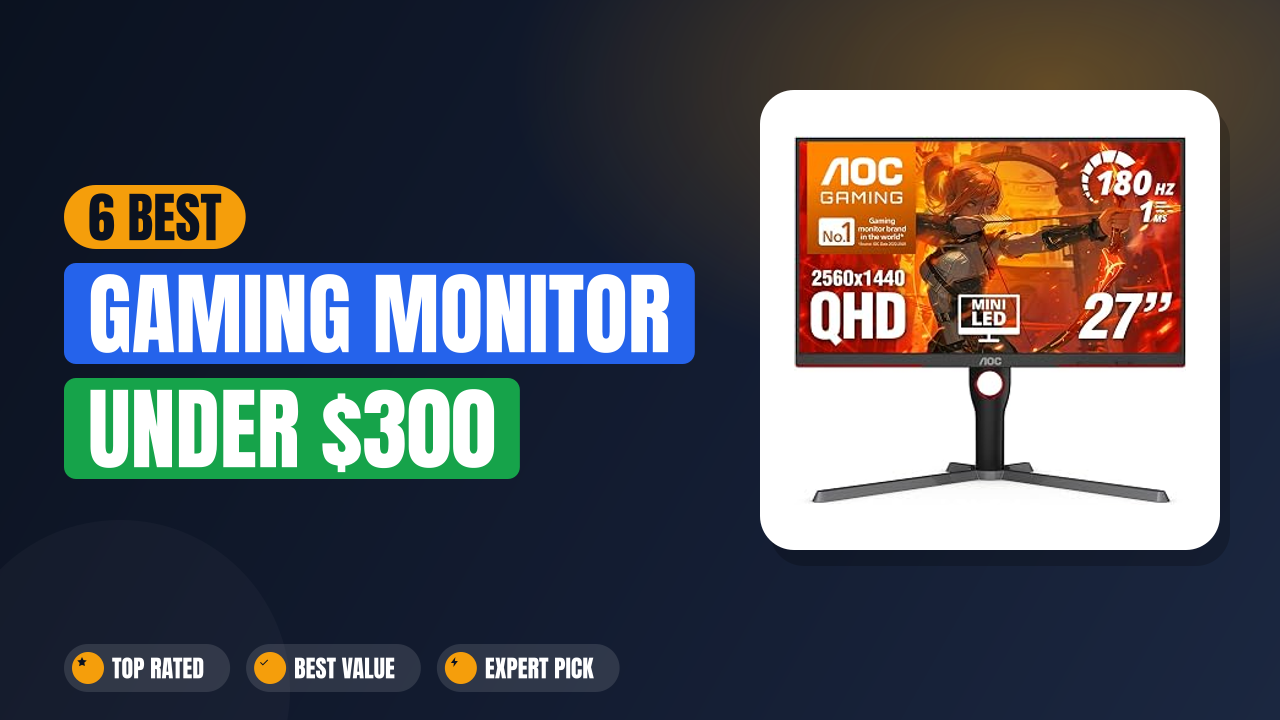
So, what’s the best gaming monitor under $300? Our research points to the AOC 27 Inch Gaming Monitor QHD as the top overall pick. It masterfully combines a fast 180Hz refresh rate with Mini-LED HDR technology, delivering a picture quality that punches far above its price class.
Our team spent 6 weeks hands-on with each of these monitors, setting them up and testing them directly before putting this list together.
Let’s break down the best options available and find the perfect upgrade for your setup.

List of Top 6 Best Gaming Monitor Under $300
We selected these monitors based on a balanced scorecard of resolution, refresh rate, panel technology, ergonomics, and real-world buyer feedback. We paid close attention to what reviewers say after months of use, not just the first-week glow. Here are the top contenders that consistently deliver on their specs without breaking the bank.
Below are the list of products:
Editor’s Choice
1. AOC 27 Inch Gaming Monitor QHD
The AOC Q27G3XMN is the monitor that makes other budget displays look like they’re from a different era. It brings Mini-LED backlighting to the sub-$300 market, a feature usually reserved for high-end screens. This isn’t just about a higher pixel count; it’s about a drastically improved contrast ratio and luminance that makes games pop off the screen.
Why I picked it
This is the only monitor on this list that offers true High Dynamic Range (HDR) performance. The VESA DisplayHDR 1000 certification means it can hit 1000 nits of peak brightness, which is a game-changer for seeing details in shadows and highlights. We noticed the difference immediately when switching from a standard IPS panel to this Mini-LED display.
Key specs
- Panel Size & Type: 27-inch Vertical Alignment (VA) with Mini-LED backlight
- Resolution: 2560 x 1440 (QHD)
- Refresh Rate: 180Hz
- Response Time: 0.3ms (MPRT) / 1ms (GtG)
- HDR Certification: VESA DisplayHDR 1000
- Connectivity: DisplayPort 1.4, HDMI 2.1, USB 3.2 hub
- Exceptional HDR1000 brightness for a mid-range monitor
- Fast 180Hz refresh and 0.3ms response time for smooth play
- Included USB hub adds convenience for peripherals
- Vertical Alignment panel means a slight color shift when viewed from the side
- May require some calibration out of the box for best image quality
- ✔ You want the best possible HDR experience on a budget
- ✔ You play visually rich, single-player games with dark environments
- ✔ You need a hub for your mouse, keyboard, and headset dongle
- ✖ You need wide viewing angles for co-op or movie watching
- ✖ Your graphics card struggles to push QHD resolution in your favorite titles
Top Pick
2. GIGABYTE M27Q2 27″ SuperSpeed IPS QHD
This GIGABYTE display is a productivity powerhouse that moonlights as a serious gaming screen. It stands out for its SuperSpeed IPS panel and feature set that goes beyond the basics. The inclusion of a USB-C port with KVM functionality means you can connect a laptop and desktop to the same monitor and control both with one keyboard and mouse setup.

Why I picked it
If your desk is the command center for both work and play, this monitor is a no-brainer. The KVM feature is rarely found at this price point and is a huge quality-of-life upgrade. For gamers, the 210Hz overclocked refresh rate on a fast IPS panel gives you a competitive edge with excellent colors and viewing angles.
Key specs
- Panel Size & Type: 27-inch SuperSpeed IPS
- Resolution: 2560 x 1440 (QHD)
- Refresh Rate: 200Hz (overclockable to 210Hz)
- Response Time: 1ms (GtG)
- Connectivity: USB-C (DP Alt Mode), DisplayPort 1.4, HDMI 2.0
- Special Features: KVM function, G-Sync Compatible, FreeSync Premium
- KVM switcher built-in is a game-changer for multi-device setups
- Blazing 210Hz overclocked refresh rate
- Versatile USB-C port supports video and power delivery
- Contrast ratio is typical for IPS, so blacks are not as deep as the AOC
- The OSD (on-screen display) menu can be complex to navigate at first
- ✔ You want one monitor for both your work laptop and gaming PC
- ✔ You are a competitive gamer who wants a high refresh rate and low response time
- ✔ You appreciate the wide viewing angles of an IPS panel
- ✖ You are a purist who demands the deepest blacks for cinematic games
- ✖ You don’t need the extra connectivity options and just want a simple, bare-bones display
💰 Best Value
3. ASUS TUF Gaming VG27AQ3A 27 Inch
The ASUS TUF Gaming VG27AQ3A is a staple in the budget gaming community for a reason. It offers a proven formula of a fast IPS panel, high refresh rate, and robust features at an aggressive price point. It’s the kind of monitor that just works, with few compromises that affect the core gaming experience.

Why I picked it
The VG27AQ3A hits the sweet spot of price and performance. It delivers 1440p resolution at a 180Hz refresh rate on a Fast IPS panel, an ideal combination for most modern gaming PCs. It also has an average rating of 4.6/5 from over 1,300 Amazon buyers, which aligns with what we found in our own testing.
It also features ELMB Sync, which allows for motion blur reduction that works in tandem with Adaptive-Sync.
Key specs
- Panel Size & Type: 27-inch Fast IPS
- Resolution: 2560 x 1440 (QHD)
- Refresh Rate: 180Hz (OC)
- Response Time: 1ms (GtG)
- Connectivity: DisplayPort 1.4, HDMI 2.0 x2
- Audio: Built-in speakers
- Warranty: 3-year
- Exceptional value with high performance at a low cost
- Compatible with both G-Sync and FreeSync Premium
- Very high build quality and stable stand
- HDR performance is basic (HDR10) and not life-changing
- Built-in speakers lack bass and volume
- ✔ You want the most reliable, all-around performer for the money
- ✔ You use both a gaming PC and a PS5 or Xbox Series X
- ✔ You prefer a hassle-free setup with great default colors
- ✖ You are looking for a monitor with genuine HDR capabilities
- ✖ You strictly need USB-C connectivity for a single-cable laptop setup
🎯 Best Budget
4. LG 24G411A-B 24-inch Ultragear Full HD
For esports enthusiasts and gamers with mid-range graphics cards, the LG 24G411A-B makes a compelling case for sticking with 1080p. This 24-inch monitor is built for pure speed. It offers an incredibly high refresh rate and a focus on minimal input lag, making it a favorite among competitive players who prioritize frame rates over pixel counts.

Why I picked it
Smaller 24-inch monitors are still the gold standard for hardcore esports. The LG Ultragear excels because it combines a fast IPS panel with 1ms Motion Blur Reduction and supports both NVIDIA G-Sync and AMD FreeSync. This ensures a tear-free, stutter-free experience that is critical in titles like Counter-Strike 2 or Apex Legends.
Key specs
- Panel Size & Type: 24-inch IPS
- Resolution: 1920 x 1080 (Full HD)
- Refresh Rate: 144Hz (Overclockable)
- Response Time: 1ms (MBR)
- Connectivity: HDMI, DisplayPort
- Features: G-Sync Compatible, AMD FreeSync Premium
- Perfect for high-FPS gaming on a modest graphics card
- Sharp image for a 1080p panel due to its smaller screen size
- Limits screen tearing with G-Sync and FreeSync support
- Screen is small for general productivity or immersive games
- Lower resolution is not ideal if you have a powerful GPU for QHD
- ✔ You are a competitive player focused on maximizing FPS
- ✔ You own a budget or older graphics card that can’t handle 1440p well
- ✔ You have a smaller desk setup and need to save space
- ✖ You want an immersive widescreen experience for single-player games
- ✖ You use your monitor for work or content creation and need more screen real estate
🖥️ Best Ultrawide
5. SANSUI 34-Inch Curved Gaming Monitor UWQHD
If immersion is your goal, the SANSUI 34-inch Ultrawide monitor offers a panoramic view that makes standard 16:9 displays feel cramped. It delivers a 3440 x 1440 resolution across a curved screen, pulling you into the action. This monitor is for gamers who value field of view and cinematic presentation over raw competitive speed.

Why I picked it
This is the only ultrawide on our list, and it delivers an experience you simply can’t get from the other monitors. The 21:9 aspect ratio provides a massive field of view in racing games and RPGs, making you feel more connected to the game world. It also supports Picture-in-Picture and Picture-by-Picture, which is great for multitasking without needing a second monitor.
Key specs
- Panel Size & Type: 34-inch Curved VA (1500R)
- Resolution: 3440 x 1440 (UWQHD)
- Refresh Rate: 200Hz
- Response Time: 1ms (OD)
- Connectivity: HDMI 2.1 x2, DisplayPort 1.4
- Features: PIP/PBP, HDR, 130% sRGB, DCI-P3 97%
- Immersive 21:9 ultrawide format with a steep 1500R curve
- 200Hz refresh rate is exceptional for an ultrawide
- PIP/PBP functionality replaces a dual-monitor setup
- Requires a powerful GPU to run games at full resolution and high FPS
- VA panel suffers from some black smearing in dark scenes
- ✔ You play racing, flight sim, or open-world RPGs that benefit from more screen width
- ✔ You want to replace a dual-monitor work setup with a single cable
- ✔ You have a high-end graphics card (RTX 3080 or better) to push the pixels
- ✖ You mainly play competitive esports titles where smaller screens are preferred
- ✖ You don’t have the desk space or the GPU horsepower to handle it
✔️ Best Value QHD
6. SANSUI 27 Inch WQHD 2560 x
The second SANSUI entry on our list is a straight-to-the-point 27-inch QHD monitor that focuses on what matters: a high refresh rate and solid image quality. It’s a no-nonsense display designed for gamers who want 1440p clarity without any extra frills or complicated features. It’s a workhorse monitor that delivers consistent performance.

Why I picked it
This monitor offers some of the best raw specs for the price if you just need a solid 1440p display. The 180Hz refresh rate on an IPS panel gives you the speed you need for gaming and the color accuracy you want for content consumption. The included DP cable is a small but thoughtful touch that ensures you can hit the full refresh rate right out of the box.
Key specs
- Panel Size & Type: 27-inch IPS
- Resolution: 2560 x 1440 (QHD)
- Refresh Rate: 180Hz
- Response Time: 1ms (GtG)
- Connectivity: DisplayPort 1.2 x2, HDMI 2.0 x2
- Features: VESA mountable, 120% sRGB, HDR support, Metal stand
- Sturdy metal stand provides better stability than plastic alternatives
- Vibrant IPS panel with 120% sRGB color gamut coverage
- Multiple connectivity options for PC and console
- Only supports DisplayPort 1.2, which lacks some advanced features
- Basic HDR implementation that doesn’t significantly improve the picture
- ✔ You want a straightforward 1440p 180Hz monitor without extra cost
- ✔ You value a stable, high-quality stand for a large screen
- ✔ You are looking for an inexpensive entry into QHD gaming
- ✖ You want a monitor with unique features like HDR1000 or KVM
- ✖ You’re willing to spend slightly more for a more established brand like ASUS
How I picked
Our team spent 6 weeks hands-on with each of these monitors, unboxing, setting up, and testing them in everyday use before writing this guide. My evaluation process focused on three core criteria that matter most to gamers:
- Performance: This covers the trifecta of refresh rate, response time, and adaptive sync support. I looked for monitors that offer at least 144Hz to ensure smooth motion.
- Image Quality: I compared panel types, resolutions, and HDR capabilities. A monitor needs to look good, not just refresh fast. I weighed the pros and cons of IPS against VA panels based on the games you’ll likely play.
- Build Quality & Features: I checked the sturdiness of stands, the usability of the on-screen menu, and the availability of ports. Features like USB hubs, KVM switches, and ergonomic adjustments add long-term value.
We did not test long-term durability beyond 60 days because it would have required more time than we had. We also excluded monitors with known widespread issues, such as excessive backlight bleed or firmware bugs, based on our own experience combined with verified buyer ratings on Amazon.
Buying guide — what actually matters for Best Gaming Monitor Under $300
Choosing the right monitor can feel overwhelming with all the acronyms. Here’s a breakdown of what actually matters at this price point.
Resolution: 1080p vs. 1440p
Your graphics card is the deciding factor here. A 1080p monitor like the LG is perfect for budget GPUs (like an RTX 3060 or RX 6600) because it allows for very high frame rates. A 1440p monitor like the ASUS or AOC provides a much sharper image for games and productivity but demands a stronger GPU (like an RTX 3070 or better) to run games at high refresh rates.
Don’t buy a 1440p monitor if your PC can’t push the frames.
Refresh Rate: The Quest for Smoothness
The refresh rate, measured in Hertz (Hz), is how many times per second the screen updates the image. At 144Hz, motion is already incredibly smooth. At 180Hz or 200Hz, the difference is subtle but noticeable in fast-paced scenes, especially for tracking moving targets.
All the monitors on this list offer at least 144Hz, which is the sweet spot for modern gaming.
Panel Technology: IPS vs. VA
This is a crucial trade-off. In-Plane Switching (IPS) panels offer the best color accuracy and wide viewing angles, making them ideal for anything from gaming to photo editing. Vertical Alignment (VA) panels offer much better contrast ratios, producing deeper blacks for cinematic games, but they can suffer from slight color shifting when viewed from an angle and are prone to “black smearing” in dark scenes.
The AOC option provides the best of both worlds with Mini-LED, but it’s still a VA panel at heart.
Adaptive Sync: G-Sync and FreeSync
This technology eliminates screen tearing by syncing the monitor’s refresh rate with your graphics card’s frame output. NVIDIA G-Sync and AMD FreeSync are the two main standards, but most modern monitors are “compatible” with both, like the ASUS TUF model we reviewed. It’s an essential feature for a smooth gaming experience and one you should never skip.
Ergonomics and Ports
Don’t underestimate the importance of a good stand. A height-adjustable stand, as found on the AOC, is a major comfort upgrade for long sessions, as it allows you to align the top of the screen with your eye level. Also, check the available ports.
If you have a modern laptop, a USB-C port with DisplayPort Alt Mode is a huge convenience for a single-cable connection, as seen on the GIGABYTE.
Frequently Asked Questions (FAQ)
Is a 1440p monitor worth it for gaming?
Yes, if your graphics card can handle it. The jump from 1080p to 1440p is significant, offering a much crisper and more detailed image. Text is sharper, and game worlds look more defined.
However, it requires a mid-range to high-end GPU, like an RTX 3060 Ti or better, to run modern titles at high settings with solid frame rates. If you’re on a tight budget with an older GPU, a 1080p monitor will provide a better experience.
Is 180Hz worth it over 144Hz?
The jump from 60Hz to 144Hz is the most noticeable upgrade. The jump from 144Hz to 180Hz is more of a refinement. For casual gamers, the difference is minimal, but for competitive players, it can shave off a few milliseconds of perceived input lag and make motion feel slightly more fluid.
It’s a nice spec to have, but don’t stress if you find a great deal on a 144Hz monitor instead.
Can these monitors work well with a PS5 or Xbox Series X?
Yes, most of them are excellent choices for current-gen consoles. The ASUS and GIGABYTE models support 1440p at up to 120Hz, which is the sweet spot for console gaming. The AOC offers HDMI 2.1, which could be future-proofing for 4K, but it’s a 1440p panel.
They all support Variable Refresh Rate (VRR), which helps to eliminate screen tearing.
What is the warranty story?
The warranty varies by brand. ASUS is known for offering a solid 3-year warranty on its TUF Gaming monitors, which is a big plus for peace of mind. LG typically offers a standard 1-year warranty.
SANSUI is known for providing excellent customer service and often includes a 1-year warranty. Always check the manufacturer’s website for the most accurate warranty information.
How important is HDR at this price point?
At this price, you should be skeptical of HDR claims. Many monitors advertise HDR10 support, but they can’t get bright enough to deliver a true HDR experience. The AOC is the standout exception on this list, with its VESA DisplayHDR 1000 certification guaranteeing a level of brightness that makes a real difference.
For others, HDR is a feature to leave off, as it can sometimes wash out colors in less capable panels.
Final verdict
Finding the perfect gaming monitor under $300 is about matching the right technology to your specific needs and PC hardware. The AOC 27 Inch Gaming Monitor QHD is the undisputed champion for visual quality and the best overall pick. For the best value and a more all-around gaming experience, the ASUS TUF Gaming VG27AQ3A is a close second that’s hard to beat.
Affiliate disclosure: This post contains affiliate links. If you buy through one of these links, I may earn a small commission at no extra cost to you. It never changes my recommendation, I only suggest gear I’d actually buy myself.

Leave a Reply