
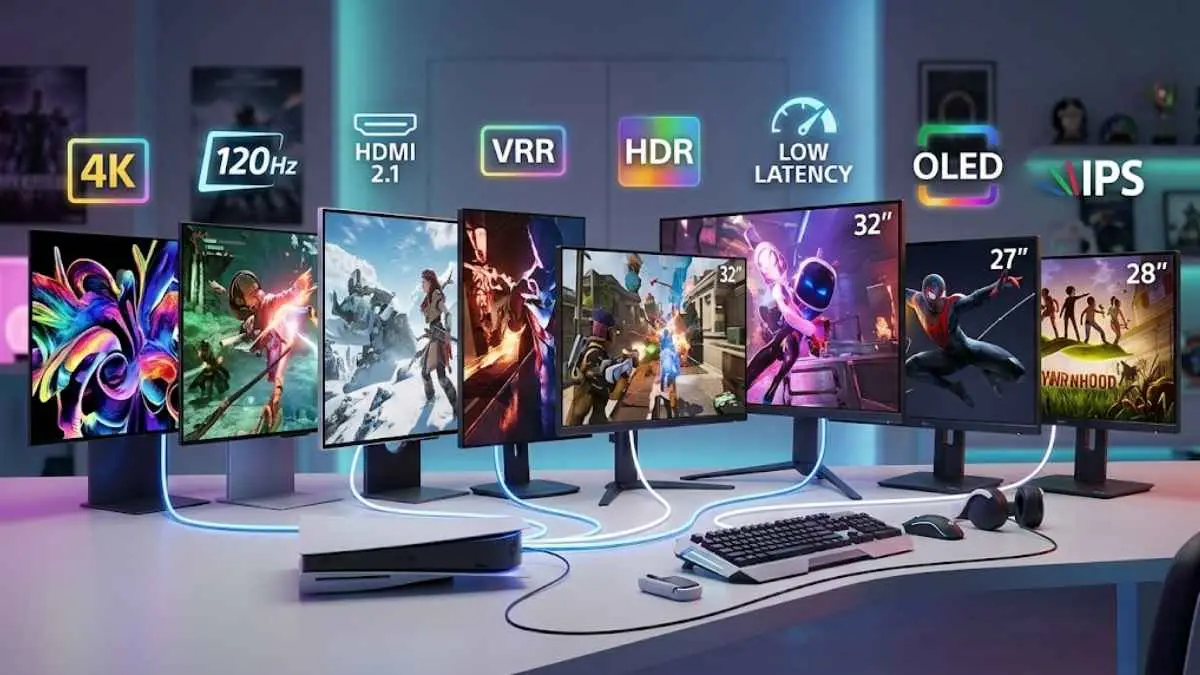

When looking for the best 4K gaming monitor for PS5, it’s beneficial to get something that can take full advantage of the console’s features. This includes HDMI 2.1 bandwidth for 4k @ 120Hz signals and VRR support to reduce screen tearing. Besides compatibility, a fast response time matters if you want minimal blur behind fast-moving objects, and good HDR picture quality with deep blacks and bright highlights improves your overall gaming experience.
We’ve tested the monitors below specifically with PS5 and PS5 Pro compatibility in mind, and these are our recommendations across every budget.
What Is The Best 4K Gaming Monitor for PS5?
The best 4K gaming monitor for PS5 that we’ve tested is the ASUS ROG Swift OLED PG27UCDM. It’s a high-end 27-inch monitor that’s superb for gaming. While the monitor’s max 240Hz refresh rate is too high to use with the PS5, it still supports any signal from the console, including 4k @ 120Hz, thanks to its HDMI 2.1 bandwidth. Additionally, it features a near-instantaneous response time, providing crystal-clear motion even with fast-moving objects.
Besides its high-end performance for console gaming, it delivers premium picture quality thanks to its QD-OLED panel. HDR games look fantastic, with rich, vivid colors and near-infinite contrast, displaying deep blacks alongside bright highlights in dark rooms. If it’s out of your budget, the Alienware AW2725Q is a good alternative that delivers similar picture quality for less.
Best Monitor For PS5 Overall
1. ASUS ROG Swift OLED PG27UCDM
The best monitor for PS5 and PS5 Pro that we’ve tested is the ASUS ROG Swift OLED PG27UCDM. It’s a high-end 4k, 27-inch monitor that’s superb for gaming. While the monitor’s max 240Hz refresh rate is too high to use with the PS5 or PS5 Pro, it still supports any signal from the console, including 4k @ 120Hz, thanks to its HDMI 2.1 bandwidth. This high refresh rate is also beneficial if you want to connect your gaming PC on the side. Additionally, it features a near-instantaneous response time, providing crystal-clear motion even with fast-moving objects.
Besides its high-end performance for console gaming, it delivers premium picture quality thanks to its QD-OLED panel. HDR games look fantastic, with rich, vivid colors. The monitor has near-infinite contrast, displaying deep blacks alongside bright highlights in dark rooms, although deep blacks appear purple in bright rooms. If you sit farther from your screen and want a bigger picture, look into the ASUS ROG Swift 32″ QD-OLED. It’s a larger version with the same panel technology, but it takes up considerably more desk space.
Key Specifications
- Screen size: 26.5-inch
- Panel type: OLED
- Sub-type: 4th-Gen Tandem QD-OLED
- Resolution: 3840 x 2160 (4K UHD)
- Brightness: 1,000 nits peak HDR
- Refresh rate: 240Hz
- Response time: 0.03ms GtG
- Viewing angle: 178° / 178°
- Contrast ratio: 1,500,000:1
- Speakers: No
- Ports: 2 x HDMI 2.1, 1 x DisplayPort 2.1, USB-C (90W Power Delivery), 3 x USB-A, 3.5mm audio out
Best Larger-Screen Monitor For PS5
2. ASUS ROG Swift OLED PG32UCDM
If you want a bigger screen than the ASUS ROG Swift OLED PG27UCDM, consider the ASUS ROG Swift 32″ QD-OLED. It’s actually very similar to the smaller model because it’s another 4k QD-OLED with the same outstanding picture quality. This means you get deep, inky blacks in dark rooms and bright highlights that pop in HDR. It also has HDMI 2.1 bandwidth that takes full advantage of the PS5 and PS5 Pro, and a near-instantaneous response time for sharp motion.
That said, there are some trade-offs to consider when opting for this over the smaller PG27UCDM. Its 32-inch size means it needs considerably more desk space, so it’s better suited to a farther viewing distance. On the plus side, it has a custom heatsink and graphene film designed to extend the panel’s lifespan, plus 90W USB-C power delivery for charging a laptop. If you want similar 4k OLED performance at a lower price, the Alienware AW2725Q is a good alternative.
Key Specifications
- Screen size: 31.5-inch
- Panel type: OLED
- Sub-type: QD-OLED
- Resolution: 3840 x 2160 (4K UHD)
- Brightness: 1,000 nits peak HDR
- Refresh rate: 240Hz
- Response time: 0.03ms GtG
- Viewing angle: 178° / 178°
- Contrast ratio: 1,500,000:1
- Speakers: No
- Ports: 2 x HDMI 2.1, 1 x DisplayPort 1.4, USB-C (90W Power Delivery), 3 x USB-A, 3.5mm audio out, optical audio out
Best Upper Mid-Range Monitor For PS5
3. Alienware AW2725Q
If you find the ASUS ROG Swift OLED PG27UCDM too expensive, consider a cheaper option, such as the Alienware AW2725Q. It’s actually very similar to the ASUS because it’s another 4k QD-OLED with the same outstanding picture quality. This means you get deep, inky blacks in dark rooms and bright highlights that pop in HDR. It’s also fantastic for gaming thanks to its near-instantaneous response time for sharp motion. It even has HDMI 2.1 bandwidth that takes full advantage of the PS5 and PS5 Pro.
That said, there are some trade-offs to consider when opting for this over the ASUS. It lacks a KVM switch, so switching between a PS5 and a PC isn’t as convenient. It also doesn’t have Dolby Vision support, so HDR content doesn’t get the same dynamic tone mapping, though this isn’t a big deal for PS5 gaming specifically since the console doesn’t require Dolby Vision to hit its full HDR10 output. If not, it’s a solid alternative that you can get at a lower cost.
Key Specifications
- Screen size: 26.7-inch
- Panel type: OLED
- Sub-type: QD-OLED
- Resolution: 3840 x 2160 (4K UHD)
- Brightness: 250 nits typical / 1,000 nits peak HDR
- Refresh rate: 240Hz
- Response time: 0.03ms GtG
- Viewing angle: 178° / 178°
- Contrast ratio: 1,500,000:1
- Speakers: No
- Ports: 2 x HDMI 2.1, 1 x DisplayPort 1.4, USB-C (15W Power Delivery), 3 x USB-A, 1 x USB-B upstream
Best Mid-Range Monitor For PS5
4. Sony INZONE M9 II
While OLEDs like the Alienware AW2725Q offer the best gaming performance and picture quality, they can be expensive if not on sale. If you want to save money, look into the Sony InZone M9 II, which is worth getting if you value PS5-specific software features over OLED picture quality. It’s a drop in picture quality from the OLED monitors on this list, because it has an IPS panel with full-array local dimming instead of true per-pixel contrast, so blacks aren’t as deep in dark rooms.
On the plus side, this monitor has PS5-specific software features built in, including Auto HDR Tone Mapping that calibrates HDR automatically once paired with a PS5. This means setup is simpler than on monitors without this software. It also has everything you’d expect in a gaming monitor, like HDMI 2.1 bandwidth, so it supports all signals with a PS5 and PS5 Pro. Plus, it avoids the burn-in risk that OLED monitors carry, which matters if you also use the same screen for non-gaming tasks.
Key Specifications
- Screen size: 26.9-inch
- Panel type: LCD
- Sub-type: IPS with Full Array Local Dimming
- Resolution: 3840 x 2160 (4K UHD)
- Brightness: 400 nits typical / 750 nits peak
- Refresh rate: 160Hz via DisplayPort / 144Hz via HDMI
- Response time: 1ms in Faster Mode
- Viewing angle: 178° / 178°
- Contrast ratio: 1,000:1 static
- Speakers: 2 x 2W
- Ports: 2 x HDMI 2.1, 1 x DisplayPort 2.1, 2 x USB-A downstream, 1 x USB-B upstream, 3.5mm audio out
Best Lower Mid-Range Monitor For PS5
5. Samsung Odyssey G7 28″ 4K
If you want a slightly larger screen without moving to OLED, the Samsung Odyssey G7 28″ 4K is a good alternative to the Sony InZone M9 II. It’s different because it has a 28-inch screen instead of 27 inches, and it has wide viewing angles that stay accurate if someone’s sitting beside you. It also has HDMI 2.1 bandwidth that supports 4k @ 120Hz with VRR on the PS5 and PS5 Pro.
That said, it has a local dimming feature that improves contrast in HDR content, but it isn’t as effective as the full-array backlighting on the Sony. This means dark scenes don’t look quite as impactful. On the plus side, its IPS panel delivers accurate colors for both gaming and everyday use, and it doesn’t have any burn-in risk to worry about.
Key Specifications
- Screen size: 28-inch
- Panel type: LCD
- Sub-type: IPS
- Resolution: 3840 x 2160 (4K UHD)
- Brightness: 300 nits typical / 400 nits peak
- Refresh rate: 144Hz
- Response time: 1ms GtG
- Viewing angle: 178° / 178°
- Contrast ratio: 1,000:1
- Speakers: No
- Ports: 2 x HDMI 2.1, 1 x DisplayPort 1.4, USB 3.0 hub, 3.5mm audio out
Best Budget Monitor For PS5 Pro
6. LG UltraGear 32GR93U-B
If you have a PS5 Pro and are looking for a budget monitor, there are a few things to consider. As the PS5 Pro has better processing than the standard PS5, it can handle 4K @ 120Hz signals better, so you’ll benefit from getting a budget 4k monitor. If that’s what you’re interested in, the LG UltraGear 32GR93U-B is a good choice. It takes a step back from the Samsung Odyssey G7 28″ 4K in a few areas, as its VESA DisplayHDR 400 certification is a modest baseline so that HDR highlights won’t stand out as much.
However, this is what you have to expect from a budget option. It’s still fantastic for gaming, as it has HDMI 2.1 bandwidth to take full advantage of the PS5 Pro with 4k signals up to 120Hz, including VRR. On the plus side, it has a larger 32-inch screen than most monitors on this list, and its 144Hz refresh rate leaves headroom if you pair it with a gaming PC later.
Key Specifications
- Screen size: 31.5-inch
- Panel type: LCD
- Sub-type: IPS
- Resolution: 3840 x 2160 (4K UHD)
- Brightness: 400 nits typical / 500 nits peak
- Refresh rate: 144Hz
- Response time: 1ms GtG
- Viewing angle: 178° / 178°
- Contrast ratio: 1,000:1
- Speakers: No
- Ports: 2 x HDMI 2.1, 1 x DisplayPort 1.4, 2 x USB-A downstream, 1 x USB-B upstream, 3.5mm four-pole audio out
Best Budget Monitor For PS5
7. Gigabyte M28U
If the LG UltraGear 32GR93U-B is still a bit expensive for you, check out the Gigabyte M28U as a cheaper option. It’s different because it has a 28-inch screen instead of 32 inches, but it’s similar in that it also has HDMI 2.1 bandwidth for 4k @ 120Hz with VRR on both the PS5 and PS5 Pro. This means you’re not giving up console performance to save money.
On the plus side, this monitor has a built-in KVM switch, which is rare at this price point and useful if you also connect a PC. That said, its HDMI 2.1 ports use Display Stream Compression, so text on colored backgrounds can look slightly less crisp during non-gaming use, though this doesn’t affect actual gameplay. It also doesn’t have the deep blacks or near-instantaneous response time of the OLED monitors earlier on this list, but for the price, it remains the most practical way to get a genuine 4k/120Hz PS5 experience.
Key Specifications
- Screen size: 28-inch
- Panel type: LCD
- Sub-type: SuperSpeed IPS
- Resolution: 3840 x 2160 (4K UHD)
- Brightness: 300 nits typical
- Refresh rate: 144Hz on PC / 120Hz on consoles
- Response time: 1ms GtG / 2ms MPRT
- Viewing angle: 178° / 178°
- Contrast ratio: 1,000:1
- Speakers: 2 x 3W
- Ports: 2 x HDMI 2.1, 1 x DisplayPort 1.4, USB-C, 3 x USB-A, 1 x USB-B upstream, 3.5mm audio out
Comparison Chart of Best 4K Gaming Monitor for PS5
| # | Category | Monitor | Screen Size | Panel | Max Refresh Rate | Price |
|---|---|---|---|---|---|---|
| 1 | Best Monitor For PS5 Overall | ASUS ROG Swift OLED PG27UCDM | 27″ | QD-OLED | 240Hz | ~$1,000 |
| 2 | Best Larger-Screen Monitor For PS5 | ASUS ROG Swift 32″ QD-OLED | 32″ | QD-OLED | 240Hz | ~$1,000 |
| 3 | Best Upper Mid-Range Monitor For PS5 | Alienware AW2725Q | 27″ | QD-OLED | 240Hz | ~$700–900 |
| 4 | Best Mid-Range Monitor For PS5 | Sony InZone M9 II | 27″ | IPS (FALD) | 160Hz | ~$800 |
| 5 | Best Lower Mid-Range Monitor For PS5 | Samsung Odyssey G7 28″ 4K | 28″ | IPS | 144Hz | ~$600 |
| 6 | Best Budget Monitor For PS5 Pro | LG UltraGear 32GR93U-B | 32″ | IPS | 144Hz | ~$500 |
| 7 | Best Budget Monitor For PS5 | Gigabyte M28U | 28″ | IPS | 144Hz | ~$350–400 |
Frequently Asked Questions
Can a PS5 handle a 4K monitor?
Yes, the PS5 can handle a 4K monitor without issue. It outputs native 4K resolution and supports 4K at 120Hz with VRR when paired with an HDMI 2.1 monitor like the ASUS ROG Swift OLED PG27UCDM. Without HDMI 2.1, a 4K monitor still works with the PS5, but caps out at 60Hz instead of 120Hz.
Which monitor is best for PS5 gaming?
The ASUS ROG Swift OLED PG27UCDM is the best monitor for PS5 gaming. Its HDMI 2.1 bandwidth supports the PS5’s full 4K at 120Hz output with VRR, and its QD-OLED panel delivers deep blacks and a near-instantaneous response time. The Alienware AW2725Q is a strong alternative if its price is out of budget.
Is 240Hz overkill for PS5?
Yes, 240Hz is overkill for PS5 gaming. The PS5 maxes out at 120Hz over HDMI 2.1, so a 240Hz monitor like the ASUS ROG Swift OLED PG27UCDM won’t run any faster on console. The extra refresh rate only matters if you also connect a gaming PC to the same monitor.
Is 4K or 1440p better for PS5?
4K delivers sharper detail, while 1440p allows higher and more consistent frame rates on the PS5. Monitors like the ASUS ROG Swift OLED PG27UCDM support native 4K at 120Hz. For games that struggle to hit 4K at 60fps, some PS5 titles automatically render at 1440p and upscale to the display.
Why do gamers prefer 1440p over 4K?
Some gamers prefer 1440p because it’s easier for a console or GPU to sustain higher frame rates at that resolution. On PS5 specifically, this preference matters less, since the console typically renders internally and upscales to whatever resolution the monitor outputs, including 4K.
Can I use a 4K 240Hz monitor with PS5?
Yes, you can use a 4K 240Hz monitor with PS5. Monitors like the ASUS ROG Swift OLED PG27UCDM support 4K at 120Hz over HDMI 2.1, which is the PS5’s maximum output. The monitor’s 240Hz ceiling isn’t reachable on PS5, but it doesn’t cause any compatibility issues.
Does 1440p look bad on a 4K monitor?
No, 1440p doesn’t look bad on a 4K monitor, but it isn’t as sharp as native 4K content. A 4K monitor upscales a 1440p signal to fill the screen, so text and fine details look slightly softer than they would on a native 1440p display of the same size.
What is the best budget 4K PS5 monitor?
The Gigabyte M28U is the best budget 4K monitor for PS5. Its HDMI 2.1 bandwidth supports 4K at 120Hz with VRR, matching the PS5’s full output at a lower price than OLED options like the ASUS ROG Swift OLED PG27UCDM. Its IPS panel doesn’t match OLED’s black levels, but it covers the console essentials.
Is 4K really worth it over 1440p?
Yes, 4K is worth it over 1440p if picture detail matters to you, since the PS5 renders native 4K output on monitors like the ASUS ROG Swift OLED PG27UCDM. If frame rate matters more than resolution, 1440p monitors can offer higher refresh rates for the same price.
Conclusion
The ASUS ROG Swift OLED PG27UCDM is the best 4K gaming monitor for PS5, thanks to its HDMI 2.1 bandwidth and QD-OLED picture quality. Budget doesn’t have to be a barrier, though. The Alienware AW2725Q delivers similar OLED performance for less, and the Gigabyte M28U covers the console essentials at the lowest price on this list. Match your pick to your budget and whether picture quality or price matters more to you.

Leave a Reply