
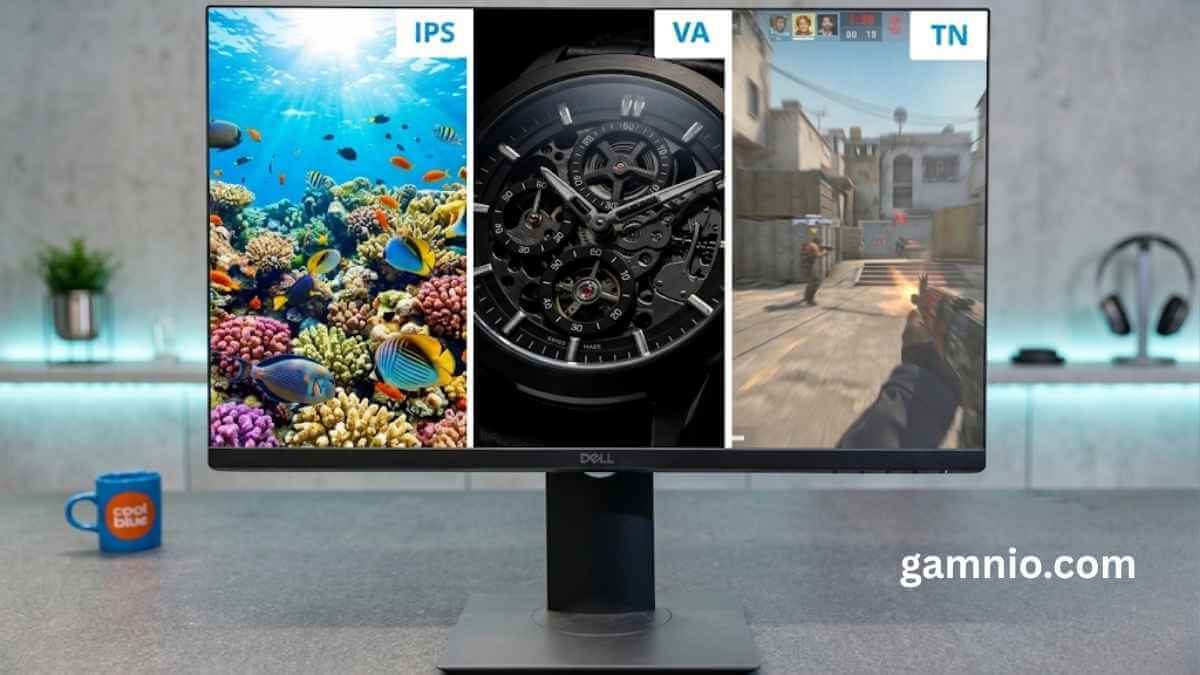

Every monitor spec sheet seems to mention IPS technology these days, in YouTube reviews, store listings, and product pages. So what is IPS technology in monitors, exactly, and why should it matter to you?
This guide breaks it down in plain language, whether you’re a designer trying to nail color accuracy, a gamer deciding between panel types, or just someone who wants a better display without overthinking it.
Here’s what you’ll find inside:
- What IPS technology actually is and how it works under the hood
- How IPS stacks up against TN, VA, and OLED panels so you can see exactly what you’re getting
- Whether an IPS monitor is worth it for your specific setup, gaming, creative work, or everyday use
Let’s get into it.
What Is IPS Technology in Monitors?
IPS (In-Plane Switching) is a type of LCD panel technology that delivers wide 178° viewing angles and accurate, consistent colors across the screen. It works by aligning liquid crystals horizontally, so colors stay true even when you’re not sitting directly in front of the display. It’s the most versatile panel type available, sitting between the budget speed of TN and the premium contrast of OLED.
What Does IPS Mean in Monitors?
IPS, or In-Plane Switching, is a type of LCD panel technology where liquid crystals align parallel to the screen rather than twisting vertically. This design helps your monitor maintain accurate colors and consistent image quality even when you view it from wide angles, making it a reliable choice for color-sensitive work.
How Does IPS Technology Work?
IPS technology works by aligning liquid crystals parallel to the glass panels, allowing light to pass through more consistently at any angle you view the screen from. Unlike older TN panels where crystals twist vertically, IPS crystals shift horizontally, which is what gives your display that stable, accurate color reproduction, whether you’re sitting dead center or off to the side.
Key Features of IPS Monitors
IPS monitors deliver wide 178° viewing angles, accurate colors with support for professional color spaces like Adobe RGB and DCI-P3, and consistent image quality from any position. Modern IPS panels also offer improved response times, making them reliable for everyday use, creative work, and gaming alike.
A. Wide Viewing Angles
One of the most recognized IPS screen features is the ability to maintain image clarity at extreme angles. Your IPS display supports up to 178° horizontal and vertical viewing angles, meaning colors and contrast stay consistent whether you’re viewing the screen straight-on or from the side. This makes IPS monitors especially valuable in collaborative environments where multiple people need to review the same screen simultaneously without experiencing color shifts or distortions.
B. Better Color Accuracy
When it comes to color precision, the IPS panel stands above most alternatives. Your IPS monitor supports professional color spaces, including Adobe RGB and DCI-P3, ensuring that what you see on screen accurately reflects the final output. This level of accuracy is critical if you work in photography, graphic design, or media production, where color consistency directly impacts the quality of your work.
C. Consistent Image Quality
Unlike some other panel types that shift in color or brightness depending on your viewing position, an IPS display maintains consistent image quality across the entire screen. No matter where you sit or how you angle your view, your monitor delivers the same reliable visual experience, reducing eye strain and improving overall productivity during extended use.
D. Good Overall Performance
With this in mind, it’s worth noting that modern IPS monitors have significantly closed the performance gap in response times. Today’s IPS panels are fast enough to handle most modern gaming demands and everyday multitasking without noticeable lag. This improvement has led more users to choose IPS for a well-rounded balance of color quality, viewing angle performance, and responsive display behavior.
Advantages of IPS Technology
IPS display advantages go far beyond just a pretty picture: you get accurate, vivid colors that stay true across different lighting conditions, wide viewing angles so the screen looks great whether you’re sitting directly in front or off to the side, and visual consistency that makes it ideal if you work in design, photography, or video editing. You’ll also notice how well it handles multitasking and entertainment, and modern IPS panels have closed the gap with gaming-focused displays, giving you fast response times without sacrificing color quality.
Common Drawbacks of IPS Monitors to Consider
IPS monitors come with a few trade-offs you should know before buying. The most notable drawbacks include a lower static contrast ratio compared to VA panels, the IPS glow effect in dark environments, and a higher price point than TN panel monitors, all of which can impact your overall display experience.
A. Lower Contrast Ratios Compared to VA Panels
When it comes to contrast performance, IPS monitors typically fall short compared to VA panels. The static contrast ratio on an IPS display is generally below average, which means blacks can appear less deep and dark scenes may lack the depth you’d see on a VA panel. If you frequently watch movies or play games in low-light environments, this is a limitation worth considering before you commit to an IPS monitor.
B. IPS Glow: What It Is and When It Becomes a Problem
IPS glow is a visual phenomenon where the backlight bleeds through the edges or corners of your screen, creating a noticeable haze in dark content. It becomes most problematic when you’re viewing your display at an angle or in a dark room. While it doesn’t affect color accuracy under normal conditions, it can be distracting during nighttime use or when watching content with dark scenes.
C. Higher Cost Compared to TN Panel Monitors
One of the most practical drawbacks of an IPS monitor is its price. Compared to TN panel monitors, IPS displays typically come at a higher cost, which can be a deciding factor if you’re working with a tight budget. While the IPS panel pros and cons often favor IPS for color and viewing angles, your budget may ultimately steer you toward a more affordable alternative.
IPS vs TN vs VA vs OLED Panels: What’s the Difference?
When comparing IPS vs TN vs VA vs OLED panels, IPS offers the best balance of color accuracy and wide viewing angles, TN wins on speed and price, VA delivers deeper contrast for dark scenes, and OLED provides the richest picture quality but at a significantly higher cost. Your choice depends on your priorities.
IPS vs TN: Speed and Affordability Against Color and Viewing Angles
| Feature | IPS | TN |
|---|---|---|
| Color Accuracy | Excellent | Poor |
| Viewing Angles | Wide (178°) | Narrow |
| Response Time | 1–4ms | 0.5–1ms |
| Price | Mid-range | Budget-friendly |
| Best For | Creative work, everyday use | Competitive gaming |
If you’re a competitive gamer who needs the fastest possible response times on a tight budget, TN panels get the job done. But if you care about how colors actually look, or you share your screen with anyone sitting beside you, IPS is the smarter pick. TN panels shift colors dramatically when viewed from an angle, which gets frustrating fast.
IPS vs VA: Contrast Depth Against Color Consistency
| Feature | IPS | VA |
|---|---|---|
| Contrast Ratio | 1000:1 (typical) | 3000:1–6000:1 |
| Color Accuracy | Superior | Good |
| Black Levels | Average | Deep, rich blacks |
| Viewing Angles | Wide | Moderate |
| Best For | Color-critical work | Movies, dark room gaming |
VA panels punch above their weight when it comes to contrast. If you watch a lot of movies or play in a dark room, the deep blacks on a VA screen can genuinely impress you. But if your work involves photo editing, graphic design, or anything where consistent, accurate colors matter across the whole screen, IPS holds a clear edge. VA panels can also show some color shifting toward the edges of the screen, which IPS handles much better.
IPS vs OLED: Premium Picture Quality Against Practical Pricing
| Feature | IPS | OLED |
|---|---|---|
| Contrast Ratio | ~1000:1 | Infinite (true blacks) |
| Color Volume | Very good | Outstanding |
| Burn-in Risk | None | Possible over time |
| Price | Affordable to mid-range | Premium to high-end |
| Best For | Every day to pro use | Enthusiasts, premium setups |
OLED monitors look absolutely stunning: perfect blacks, incredible contrast, and colors that practically pop off the screen. If picture quality is your top priority and your budget allows it, OLED is hard to beat. But your IPS monitor won’t age with burn-in risk the way OLED can, and you’ll spend considerably less money getting great color performance. For most people, IPS hits the sweet spot between quality and value.
Which Panel Type is Best?
There’s no single winner; it comes down to what you actually need your monitor to do for you.
- Choose IPS if you want reliable color accuracy, wide viewing angles, and solid all-around performance for work, gaming, or creative projects.
- Choose TN if you’re a hardcore competitive gamer chasing the lowest possible response times on a budget.
- Choose VA if you watch a lot of content in dark environments and want richer contrast without jumping to OLED pricing.
- Choose OLED if you want the absolute best visual experience and you’re willing to invest in a premium display.
For the majority of users, whether you’re editing photos, working from home, or enjoying the best IPS monitor for gaming, an IPS display covers your needs without compromise.
Is an IPS Monitor Good for Gaming?
Yes, an IPS monitor is good for gaming, especially if color accuracy, wide viewing angles, and visual clarity matter to you. Modern IPS panels now reach 144Hz, 165Hz, and even 240Hz refresh rates with response times as low as 1ms (GtG), making the best IPS monitor for gaming a genuinely competitive choice alongside TN alternatives. Where IPS panels truly shine for gamers is in visually rich titles like open-world RPGs, racing sims, and story-driven games, where the richer colors and accurate contrast make every scene look stunning. You’ll also notice far less color shift when you slightly move your head, which matters during long sessions. The only trade-off is a slightly higher price compared to TN panels, but for most gamers, the visual upgrade is absolutely worth it.
Who Should Choose an IPS Monitor
IPS monitors are a strong fit for anyone who values color accuracy, wide viewing angles, and consistent image quality. Whether you’re a graphic designer, photographer, video editor, student, office worker, gamer, or general home user, an IPS display ensures your visuals stay true and sharp from every angle.
Who Benefits Most from an IPS Monitor
| User Type | Why IPS Works for You |
|---|---|
| Graphic Designers | You rely on precise color reproduction and wide color gamut support like Adobe RGB and DCI-P3 to ensure your designs look accurate across all output formats. |
| Photographers | You need on-screen colors to match your final prints or exports, and an IPS panel delivers the accuracy required for professional-grade photo editing. |
| Video Editors | You work with color grading and media production, where consistent, true-to-life colors are non-negotiable. IPS panels support professional color spaces to meet that demand. |
| Gamers | If you prioritize visual spectacle over raw speed, modern IPS monitors offer significantly improved response times alongside superior color quality and 178° viewing angles. |
| Students | You spend long hours reading, researching, and working on projects. IPS panels reduce color distortion and eye strain across extended sessions. |
| Office Workers | You need versatile, distortion-free viewing across multiple tasks and documents, and IPS monitors deliver consistent image quality from virtually any angle. |
| General Home Users | You want a reliable, all-purpose display that handles streaming, browsing, and casual use with stunning color accuracy and wide viewing comfort. |
Things to Consider Before Buying an IPS Monitor
Before buying an IPS monitor, check screen size, resolution, refresh rate, response time, and color coverage. These five factors shape your daily experience, whether you’re editing photos, gaming, or working. Getting them right means you won’t overspend on specs you don’t need or miss features that actually matter for your workflow.
A. Screen Size
Your screen size should match your desk space and how far you sit from the display. For most users, 24 to 27 inches hits the sweet spot, big enough to work comfortably, small enough to keep everything in view without moving your head. If you’re doing video editing or gaming, a 32-inch IPS display gives you more room to breathe.
| Use Case | Recommended Size |
|---|---|
| General office work | 22–24 inches |
| Content creation / editing | 27–32 inches |
| Gaming | 27–32 inches |
| Multi-monitor setup | 24–27 inches per screen |
B. Resolution
Resolution decides how sharp everything looks on your IPS display. A 1080p (Full HD) panel works fine for everyday tasks and budget builds. Step up to 1440p (QHD), and you get noticeably sharper text and images, a real win for designers and gamers. If you want the sharpest possible picture and your GPU can handle it, 4K on a 27-inch or larger IPS monitor is stunning.
- 1080p — Budget-friendly, great for 24-inch screens
- 1440p — Best balance of sharpness and performance
- 4K — Ideal for creative work and large screens
C. Refresh Rate
Refresh rate tells you how many times per second your screen updates the image. For office work and creative tasks, 60Hz on an IPS monitor is perfectly smooth. If you’re gaming, though, you’ll want at least 144Hz, as the movements feel much more fluid and responsive. High-end IPS gaming monitors now go up to 240Hz or even 360Hz for competitive play.
- 60Hz — Fine for everyday use and content creation
- 144Hz — Great starting point for gaming
- 240Hz+ — Competitive gaming and fast-paced titles
D. Response Time
Response time measures how fast a pixel changes color, and a slower response time causes motion blur in fast scenes. Traditional IPS panels sit around 4–5ms, which is fine for most users. Modern fast IPS panels push down to 1ms (GtG), making them genuinely competitive for gaming. If you’re buying the best IPS monitor for gaming, always check for a fast response time spec on the product page.
E. Color Coverage
Color coverage is one of the strongest selling points of an IPS panel. Look for monitors that cover at least 99% of the sRGB for everyday use or web content. If you’re doing professional photo or video editing, aim for 90%+ DCI-P3 or Adobe RGB coverage; that’s where IPS display advantages really show up compared to TN panels. Wider color coverage means more accurate, truer-to-life colors in your work.
| Color Space | Ideal For |
|---|---|
| 99% sRGB | Web design, general use |
| 90%+ DCI-P3 | Video editing, photography |
| Adobe RGB | High-end print and photo work |
Are IPS Monitors Worth It?
Yes, an IPS monitor is worth it for most people. If you care about accurate colors, wide viewing angles, and a display that looks great whether you’re editing photos, streaming, or gaming, an IPS panel delivers. Unless you’re on a tight budget or need extreme contrast, it’s the smartest choice you can make.
Conclusion
IPS monitors stand out as one of the most versatile display options available today. With exceptional color accuracy, ultra-wide 178° viewing angles, and steadily improving response times, they deliver a visual experience that suits a wide range of users, from graphic designers and photographers to everyday users and gamers who value image quality. While they do come with trade-offs like lower contrast ratios compared to VA panels and a higher price tag than TN options, the overall package makes them a strong choice for anyone who prioritizes consistent, high-quality visuals.
That said, the “best” monitor is ultimately the one that fits your specific needs. If raw speed and affordability are your top priorities, a TN panel might serve you better. If deep blacks and rich contrast matter most, a VA monitor could be the right fit. And if you want the absolute best picture quality and budget isn’t a concern, OLED delivers an unmatched experience. But if you’re looking for a reliable all-rounder that handles creative work, everyday tasks, and gaming with ease, an IPS monitor is hard to beat. Take stock of how you use your screen, weigh the pros and cons covered in this guide, and you’ll be well-equipped to make the right call.
FAQs About IPS Technology in Monitors
1. What does IPS stand for in a monitor?
IPS stands for In-Plane Switching, a type of LCD panel technology where liquid crystals rotate horizontally instead of twisting vertically. This design was developed to fix the poor viewing angles and weak color reproduction found in older TN panels. IPS remains the most balanced panel type for color accuracy, wide viewing angles, and everyday reliability.
2. Is an IPS monitor good for gaming?
Yes, modern IPS monitors are good for gaming. Older IPS panels suffered from slow response times, but today’s IPS displays reach refresh rates up to 500Hz with response times as low as 1ms. Combined with superior color accuracy and 178° viewing angles, IPS now competes directly with TN and VA panels for gaming performance.
3. What is the difference between IPS and TN panels?
IPS and TN panels differ mainly in color accuracy, viewing angles, and speed. IPS delivers wider viewing angles and richer, more accurate colors, while TN panels offer faster response times and lower prices. TN suits budget-focused, competitive gaming setups, whereas IPS suits users who prioritize visual quality across design, editing, and everyday use.
4. Does an IPS monitor have screen burn-in?
No, IPS monitors do not have burn-in risk. Unlike OLED displays, which use organic pixels that can degrade unevenly with static images over time, IPS panels rely on an LED backlight and liquid crystals that don’t develop permanent image retention. This makes IPS a safer long-term choice for office use, coding, or dashboards with static content.
5. What is IPS glow, and is it normal?
IPS glow is a light haze that appears near the corners or edges of an IPS screen, especially in dark rooms or at an angle. It’s caused by backlight bleed through the liquid crystal layer and is considered normal for IPS technology. It’s most noticeable during dark scenes and doesn’t affect color accuracy in daily use.
6. Is IPS or VA better for a monitor?
IPS is better for color accuracy and wide viewing angles. At the same time, VA is better for contrast and deep blacks, typically 3000:1–6000:1 versus IPS’s 1000:1. Choose IPS for design, photo editing, or multi-person viewing, and choose VA for movies or gaming in dark rooms where richer contrast matters more than color precision.
7. Are IPS monitors worth the extra cost?
Yes, IPS monitors are worth the extra cost for most users. They deliver accurate colors, support professional color spaces like Adobe RGB and DCI-P3, and maintain image quality from nearly any viewing angle. Unless you need the absolute fastest response time on a tight budget, IPS offers the best overall value for color and versatility.



Leave a Reply